This post is a continuation or part 2 of my previous one Foundation Models – the future of iOS Development. The idea is to show a real use-case using the Foundation Models framework. I’ve decided to create an example of creating a prompt that will generate a weekly workout plan. So this is not a chat bubble application where you can discuss with the Apple Intelligence, but you have a pre-defined prompt that asks the Foundation Models to generate useful information guided with the Swift macros like @Generable and @Guide.
Who it’s for
If you are an iOS developer who wants to see real use-case using Apple Intelligence and LLM you are at the right place. At the same time I will try to simplify the thing as much as possible so anyone can understand the points and the context.
Motivation
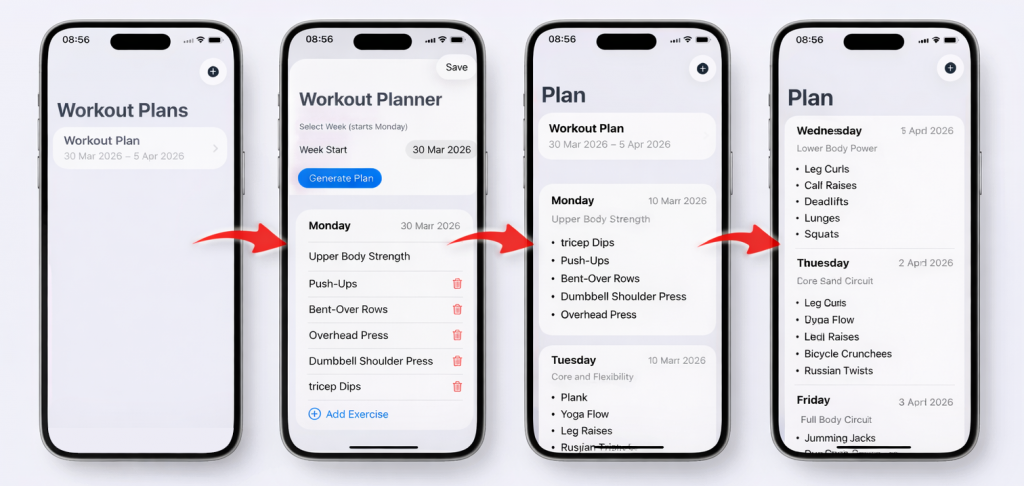
The environment I’m working in is increasingly sports-oriented – runners, bikers, cross-fitters, tennis players, SUP-ers. One of the activities that connects all of this is gym and workout plans. I remember struggling to find the correct exercises or workout plan in the past. That’s why I’ve decided to create a workout plan generator using Foundation Models and Apple Intelligence. Here is how it looks
Architecture at a glance
What contains the iOS app solution?
- SwiftUI (PlansHomeView / WorkoutPlannerView / WeeklyPlanDetailView)
Pure presentation + user actions. No AI logic, no persistence logic. - WorkoutPlannerVM (ViewModel, well-known from MVVP pattern)
The only place that talks to the model. Builds the prompt, calls LanguageModelSession, validates/dedups, maps weekdays → real dates, and saves/loads via SwiftData. - FoundationModels (LanguageModelSession, Prompt, @Generable)
Produces a typed [WorkoutSchedule] instead of free text. - SwiftData (WeeklyPlan → WorkoutDay → Exercise)
Normalized storage; drives the list and detail views via @Query.
Why this shape
It keeps AI variability at the edge (the VM), while UI and storage stay deterministic and testable. The same pattern generalizes to meal plans, study plans, trips—any “generate → edit → save” workflow.
The schema: @Generable model
The @Generable type is the contract that keeps the model honest. Instead of asking for prose, you ask for a concrete array of WorkoutSchedule, and the framework parses/validates the LLM output into that type. If parsing fails, you’ll know immediately—no brittle JSON string-wrangling.
How the fields guide generation
- day: String with @Guide(.anyOf([…])) pins the value to one of Monday–Sunday. That makes it trivial to map to an actual date within the selected week (no fuzzy “Leg Day” labels to decode).
- dayTitle: String is a human-friendly summary (e.g., “Upper Push + Core”). It’s unconstrained but nudged by the description to stay short and thematic.
- exercises: [String] is the actionable payload: exactly 5 concise names per day. We still enforce this in a tiny post-process step (dedup + padding), because business rules belong in your app, not just the prompt.
Why schema-first beats free text
- Typed by default: You get [WorkoutSchedule], not a blob. Easier to render, edit, and persist.
- Lower error surface: Fewer hallucinated fields/keys; the parser rejects nonconforming output.
- Composable: You can evolve the model (e.g., add intensity: Int later) without rewriting the UI.
Practical tips
- Keep field names concrete and singular (“exercise” strings, not paragraphs).
- Use @Guide(.anyOf(…)) or ranges to restrict hotspots (enums, counts, simple formats).
- Treat prompts as hints, not guards: keep a light validator (like dedup + exact count) in your VM.
Code, implementation
Let’s check how this works in the real-use case. I will try to explain the main parts of the implementation:
1. Prompt strategy (typed output)
I will say this is the most important part using FoundationModels – to use the prompting in the right way. The user must ask exactly what he needs. The specific constraints should be mentioned in the prompt in order to have a more precise result in the output.
In our case we have in the prompt these key parts: 7 days, 5 exercises/day, no duplicates—and return a typed array using @Generable. Below is the complete code:
let prompt = Prompt("""
You are a coach. 7 days (Mon–Sun), exactly 5 exercises/day, no duplicates.
Use concise names (e.g., "Goblet Squat"). Output: [WorkoutSchedule]
""")
let schedules: [WorkoutSchedule] = try await session
  .respond(to: prompt, generating: [WorkoutSchedule].self)
  .content
Why: The model returns [WorkoutSchedule] (not prose), which is trivial to render and validate. You keep the prompt short and imperative so it’s easy to maintain.
2. Post-processing & mapping to dates
The next part is classic Swift coding – we enforce the business rules (dedup + pad to 5) and resolve weekday strings to real dates in the chosen week.
// Map Mon..Sun → dates in the selected week
let cal = Calendar.current
let monday = cal.monday(for: weekStartMonday)
let df = DateFormatter(); df.locale = .current; df.dateFormat = "EEEE"
let nameToDate = Dictionary(uniqueKeysWithValues: (0..<7).map { i in
  let d = cal.date(byAdding: .day, value: i, to: monday)!; return (df.string(from: d), d)
})

// Dedup + pad
var used = Set<String>()
func clean(_ xs: [String]) -> [String] {
  var out:[String]=[]
  for s in xs.map({ $0.trimmingCharacters(in:.whitespacesAndNewlines) }) where !s.isEmpty {
    let k = s.lowercased(); if !used.contains(k) { used.insert(k); out.append(s) }
    if out.count == 5 { break }
  }
  while out.count < 5 { out.append("Mobility Flow \(out.count+1)") }
  return out
}
Why: Prompts are hints, not guarantees—so enforce rules in code. Mapping “Monday” → a real Date makes the plan usable in UI and storage.
3. UX flow (Generate → Edit → Save)
How does the UX flow work? For this use-case I’ve chosen a modern iOS-pattern. Main home page with top-right navigation bar action to open generate a new weekly workout plan.
On save action we are using auto-refresh so the user has to do nothing before seeing the actual results.
4. Persistence with SwiftData (minimal save)
In apps like this one it’s very important to save the data and have it when the user is out of connection. I’ve also chosen a modern persistence approach using SwiftData. It’s made by creating SwiftData models from the generated+cleaned items. After that the models are saved.
Why: Keep persistence dead simple: transform → sort → save. Normalized models (WeeklyPlan → WorkoutDay → Exercise) make later edits and analytics straightforward.
var days:[WorkoutDay]=[]
for item in schedules {
  guard let date = nameToDate[item.day] else { continue }
  let ex = clean(item.exercises).map { Exercise(name: $0) }
  days.append(WorkoutDay(date: date, dayTitle: item.dayTitle, exercises: ex))
}
days.sort { $0.date < $1.date }

let plan = WeeklyPlan(weekStart: monday, title: "Workout Plan", days: days)
context.insert(plan)
try context.save()
Conclusion
You don’t need a chat UI to get real value from LLMs. By pairing FoundationModels with a schema-first approach (@Generable), a tiny post-processing layer, and a familiar Generate → Edit → Save flow, you ship something users can actually live with: typed data that renders cleanly, survives edits, and persists via SwiftData. The ViewModel owns the variability; your UI and storage stay predictable—and testable.
This pattern generalizes well: meal plans, study schedules, trip itineraries, content calendars—anything that’s list- or schedule-shaped. Start with a tight schema, keep prompts short, validate in code, and let SwiftUI handle the rest.
Full repo: https://bitbucket.org/n47/workout-planner-ios/src/main/
* Note: Xcode 26 and macOS Tahoe 26.0 or later are required to test the code.
** Important: The version of your macOS Tahoe should be aligned with your Xcode version or simulator version in order to be able to test the code. What that means: If you have macOS Tahoe 26.4 you must have Xcode version 26.4 and simulators version 26.4.
What’s next
- Per-day “Regenerate” with “avoid list” context
- Equipment/intensity filters (prompt params)
- Export as Markdown/PDF + Calendar reminders
- Optional on-device model toggle and caching
Thanks for reading—if this helped, feel free to fork, iterate, and make it your own.