- Secure Multi-Tenancy in Spring Boot with PostgreSQL Row Level Security
- Multi-Tenancy Models
- Multi-Tenancy with Spring Boot and PostgreSQL (RLS) – Our Approach
- Architecture Overview
- Using Keycloak for Tenant Identification
- PostgreSQL Setup (Row Level Security)
- Spring Boot Configuration
- Benefits of This Approach
- Conclusion
Secure Multi-Tenancy in Spring Boot with PostgreSQL Row Level Security
When building a SaaS application, one of the first architectural decisions you’ll face is deceptively simple: how do you make sure Company A can never see Company B’s data?
Multi-tenancy is the architectural pattern that answers this question, a setup where a single application instance serves multiple customers, called tenants, while keeping their data completely isolated from one another.
There are several ways to implement this, and the approach you choose has lasting consequences for your security model, infrastructure complexity, and scalability. In this post, we walk through our preferred approach: a shared database with Row Level Security (RLS) enforced directly by PostgreSQL, wired into a Spring Boot application with Keycloak handling authentication.
If you’ve seen implementations that rely purely on application-level filtering to separate tenant data, you’ll appreciate why pushing that enforcement down to the database level makes a meaningful difference.
Multi-Tenancy Models
There are several ways to implement multi-tenancy.
1. Database per Tenant
Each tenant has its own database.
Pros: Strong isolation
Cons: Hard to scale with many tenants, Infrastructure management becomes complex
2. Schema per Tenant
A single database with a separate schema for each tenant.
Here is an existing blog covering this approach: Multitenancy with Spring Boot — N47
Pros: Good isolation, Easier management than multiple databases
Cons: Schema migrations must be executed per tenant
3. Shared Database, Shared Schema
All tenants share the same tables, and data is separated using a tenant identifier column.
Example: tenant_id
Pros: Easy scaling, Single database migration, Easy tenant onboarding
Cons: Requires strong access control to avoid data leaks
A practical and elegant way to make this model secure is to rely on PostgreSQL’s Row Level Security (RLS) to enforce data isolation. This is the approach we’ll use.
Multi-Tenancy with Spring Boot and PostgreSQL (RLS) – Our Approach
At N47, we’ve applied this exact pattern when building SaaS products where data isolation is a contractual requirement, not just a best practice. The shared schema model with RLS gives us the right balance: operational simplicity and infrastructure efficiency, without compromising the security boundary between tenants. It’s the architecture we reach for when a client needs to move fast without cutting corners on security. You can see the kind of products this thinking goes into on our Hello Today project page.
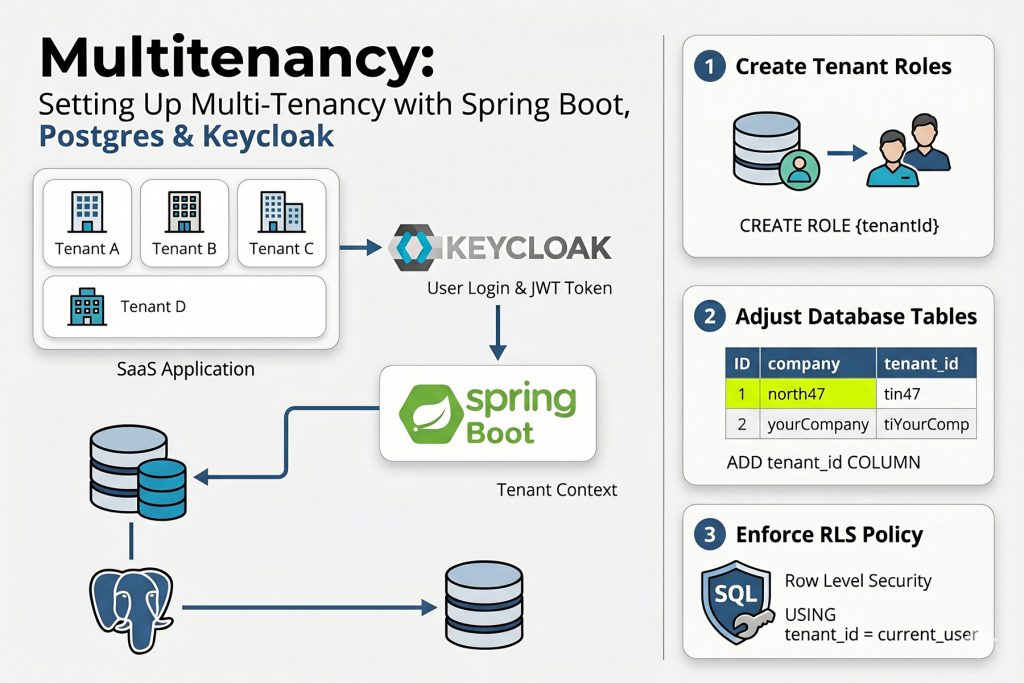
The idea is straightforward:
- Spring Boot sets the correct
tenantIdfor each request - PostgreSQL enforces data isolation using RLS
This setup provides strong tenant isolation while keeping the architecture simple.
In this example, we use:
- Spring Boot
- PostgreSQL
- Row Level Security (RLS)
- Keycloak for authentication
Each table includes a tenant_id column, and PostgreSQL ensures that tenants can only access their own data.
Architecture Overview
Before diving into the code, it’s worth mapping the full request flow so that each component makes sense in context.
Our solution has two distinct responsibilities. Spring Boot is responsible for identifying the tenant on every incoming request and propagating that identity throughout the request lifecycle. PostgreSQL is responsible for enforcing data isolation, ensuring that every database query automatically returns only the rows belonging to the active tenant.
The flow for every request looks like this:
- A request arrives carrying a JWT token issued by Keycloak.
- The
TenantFilterextracts thetenantIdclaim from the token and stores it in aTenantContext— a thread-local variable accessible anywhere in the application for the duration of that request. - When a database connection is opened, Hibernate’s connection provider executes
SET ROLE {tenantId}, switching the active PostgreSQL role to the role that belongs to that tenant. - PostgreSQL’s Row Level Security policy evaluates
tenant_id = current_useron every query and automatically filters rows — no application-levelWHEREclause required. - Once the request completes, the connection executes
RESET ROLE, theTenantContextis cleared, and the connection is returned to the pool cleanly.
To support this flow, we store the tenantId in two places: as a user attribute inside the Keycloak JWT token, and as a tenant_id column on every database table. This dual setup allows tenant context to travel from the authentication layer all the way down to database-level enforcement without any extra filtering logic scattered through the application code.
Using Keycloak for Tenant Identification
We use Keycloak as the identity provider.
When creating a user, we store the tenantId as a user attribute.
Example:
private Map<String, List<String>> mapAttributes(UserCreateInput userCreateInput) {
    Map<String, List<String>> attributes = new HashMap<>();
    attributes.put("tenantId",
        List.of(authenticationFacade.getAuthenticatedUser().getTenantId()));
    return attributes;
}
This attribute is included in the JWT token, allowing our backend to determine to which tenant a user belongs to.
PostgreSQL Setup (Row Level Security)
1. Create Tenant Role
Each tenant is represented as a PostgreSQL role.
CREATE ROLE {tenantId};

GRANT {tenantId} TO CURRENT_USER;

GRANT USAGE ON SCHEMA public TO {tenantId};

GRANT SELECT, INSERT, UPDATE, DELETE
ON ALL TABLES IN SCHEMA public
TO {tenantId};

ALTER DEFAULT PRIVILEGES IN SCHEMA public
GRANT SELECT, INSERT, UPDATE, DELETE ON TABLES TO {tenantId};
This ensures the tenant role has access to the tables.
2. Create Table with Tenant Column
Example table:
CREATE TABLE employee
(
    id UUID PRIMARY KEY,
    first_name TEXT NOT NULL,
    last_name TEXT NOT NULL,
    tenant_id TEXT
);
3. Enable Row Level Security
ALTER TABLE employee ENABLE ROW LEVEL SECURITY;
4. Create Tenant Policy
CREATE POLICY check_tenant_owner
ON employee
USING (tenant_id = current_user);
Now PostgreSQL ensures tenants only see their own rows.
5. Automatically Populate tenant_id
We use a trigger to automatically populate the tenant_id.
CREATE FUNCTION set_tenant_id()
RETURNS TRIGGER AS $$
BEGIN
    NEW.tenant_id = current_user;
    RETURN NEW;
END;
$$ LANGUAGE plpgsql;
Trigger:
CREATE TRIGGER employee_trigger_set_tenant_id
BEFORE INSERT ON employee
FOR EACH ROW
EXECUTE PROCEDURE set_tenant_id();
Now every inserted row automatically receives the correct tenant_id.
Spring Boot Configuration
Spring Boot ensures that the correct tenant role is set for every request.
TenantContext
In a typical Spring Boot application, one thread handles a single request. By storing the tenantId in a ThreadLocal, we attach the tenant information to that thread. This allows any part of the application to access the current tenant without explicitly passing it through every method call.
public final class TenantContext {

  private static final ThreadLocal<String> tenantId =
      new InheritableThreadLocal<>();

  public static void setTenantId(String tenant) {
    tenantId.set(tenant);
  }

  public static String getTenantId() {
    return tenantId.get();
  }

  public static void clear() {
    tenantId.remove();
  }
}
Tenant Filter
This filter is the piece that “activates” the TenantContext for every incoming request. It ensures that the tenant is set before the application logic runs, and just as importantly, cleaned up afterward.
OncePerRequestFilter is a Spring component that guarantees the filter runs exactly once per HTTP request.
public class TenantFilter extends OncePerRequestFilter {

  @Override
  protected void doFilterInternal(HttpServletRequest request,
      HttpServletResponse response,
      FilterChain filterChain)
      throws ServletException, IOException {

    String tenantId = HtAuthenticationUtils.getOptionalTenantId();

    TenantContext.setTenantId(tenantId); // <-- here we we set the tenantId, value extracted from the jwt token

    filterChain.doFilter(request, response);

    TenantContext.clear(); // <-- cleanup, after the completion of the request
  }
}
Tenant Identifier Resolver
Hibernate uses this class to determine the active tenant.
@Component
public class TenantIdentifierResolver
        implements CurrentTenantIdentifierResolver {

  @Override
  public String resolveCurrentTenantIdentifier() {

    return TenantContext.getTenantId() != null
        ? "\"" + TenantContext.getTenantId() + "\""
        : "Non existing tenant.";
  }

  @Override
  public boolean validateExistingCurrentSessions() {
    return false;
  }
}
Connection Provider
The connection provider sets the PostgreSQL role.
@Override
public Connection getConnection(String tenantIdentifier)
        throws SQLException {

  final Connection connection = dataSource.getConnection();

  try (PreparedStatement preparedStatement =
           connection.prepareStatement(
             "SET ROLE " + tenantIdentifier)) {

      preparedStatement.execute();
  }

  return connection;
}
After the request finishes:
@Override
public void releaseConnection(String tenantIdentifier,
        Connection connection) throws SQLException {

    try (Statement sql = connection.createStatement()) {
        sql.execute("RESET ROLE");
    }

    connection.close();
}
Benefits of This Approach
- Simple infrastructure: One database, one schema, no per-tenant deployments
- Strong security: PostgreSQL enforces data isolation
- Easy tenant onboarding: New tenants can be created dynamically by adding a new role
- Centralised migration: Database changes apply to all tenants.
Conclusion
Combining Spring Boot’s request lifecycle management with PostgreSQL Row Level Security gives you a multi-tenancy solution that is both simple to operate and genuinely difficult to misconfigure. The isolation guarantee lives at the database level, which means a bug in your application logic cannot accidentally leak one tenant’s data to another. PostgreSQL will catch it.
To recap what this architecture delivers: one database, one schema, centralised migrations, dynamic tenant onboarding, and a security boundary that PostgreSQL enforces on every single query, regardless of what the application layer does.
A few things worth keeping in mind as you implement this in production: validate and sanitize the tenantId before concatenating it into any SQL string, be deliberate about whether InheritableThreadLocal is the right choice if you use async processing, and add a NOT NULL constraint to your tenant_id columns so the schema enforces what the policy protects.
If you’re building a SaaS product and want to get the architecture right from the start — or if you’ve inherited a multi-tenant system held together by application-level filters and you’re starting to lose sleep over it — we’d love to talk. At N47, this is exactly the kind of problem we help clients solve. Get in touch or take a look at our Software Engineering and Architecture services to see how we work.
And if you enjoy solving problems like this one, we’re hiring.